
ACF Onyx Poll
Create polls using ACF.
By andremacola · Last updated 11 Oct 2026 · Free on wordpress.org
Description
Onyx Poll creates lightweight polls with the WordPress REST API and JavaScript. ACF and ACF PRO are not required.
Features
- Block editor integration with live preview, standard and Twitter styles.
- Shortcode, sidebar widget and automatic modal.
- Multiple polls per page, answer images and registered thumbnail sizes.
- Editable answer counters; the total is always their sum.
- Percentage, number or combined results, with an option to hide results until expiration.
- Voting intervals enforced on the server for signed browser sessions.
- Automatic expiration and an hourly WP-Cron task.
- Native administration with media selection and answer reordering.
- Dedicated tables for poll rules, answers and vote counters.
- Settings descriptions, help, cron execution status and WordPress Site Health integration.
- Optional permanent cleanup on uninstall; data is kept by default.
Upgrading from the ACF version
IMPORTANT: 2.0 is a major update with breaking changes to requirements and internal storage. Back up the full database and plugin files, and test the update on a staging copy before updating a production site. See the breaking changes below and the migration FAQ.
Migration starts automatically on activation or on the next WordPress request after upgrading an already active plugin from 1.2.0 or an earlier ACF version. No manual export, import or reactivation is needed. The plugin creates {prefix}onyx_polls and {prefix}onyx_poll_answers and copies existing polls in resumable batches of 50 per request. A requested poll is imported on demand if its batch has not run yet, including the latest-poll shortcode and modal selection.
IDs, titles, publication status, answer order and text, image references, individual vote counters, dates, voting limits, result preferences and global settings are preserved. Existing blocks, shortcodes and widgets keep working without editing post content. Each poll is imported in a database transaction; retrying migration does not overwrite already imported polls or votes received in 2.0.
Legacy custom fields are kept for recovery and are not deleted by the update. New rules and votes are written only to the plugin tables. ACF is not required to run the plugin or migration; keep it installed if your theme or another plugin still needs it. The database user must be allowed to create the plugin tables.
Breaking changes in 2.0
- Minimum requirements are now WordPress 6.3 and PHP 7.4. Check the hosting environment before updating.
- Poll data moves from WordPress custom fields to the plugin tables. Custom templates, snippets or integrations that read or write ACF fields or onyx_poll_* post metadata must be adapted; those legacy fields stop receiving updates. The plugin’s existing shortcodes, block identifier, widget and public REST routes remain compatible.
- Total votes is now read-only and equals the sum of answer counters. A manually entered total that differed from that sum will change during migration; individual answer counters are preserved.
- Poll editing and settings use native plugin forms. Customizations that depend on ACF field registration, form markup or ACF-specific hooks must be reviewed.
- Downgrading to 1.2.0 does not copy new votes or edits back into legacy fields. Restoring an old backup also loses changes made after that backup. Plan rollback with a current database backup; do not use downgrade as a way to reverse migration.
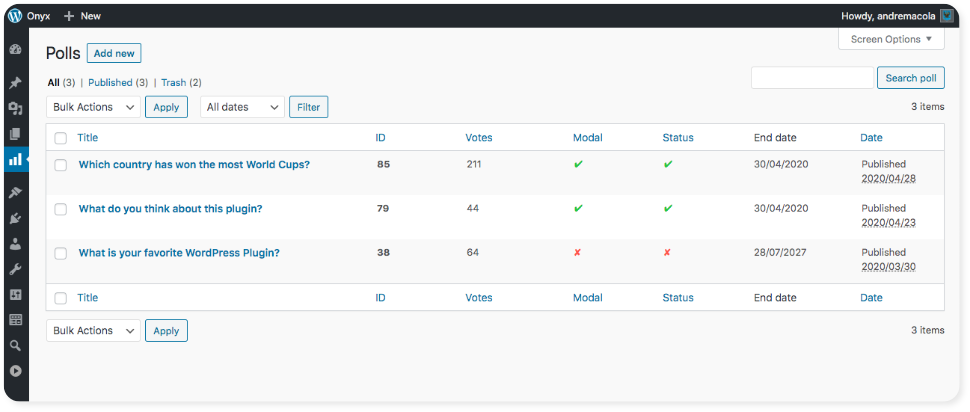

Installs over time
Install
With WP-CLI, from your site’s root folder:
wp plugin install acf-onyx-poll --activate- Install Onyx Poll through the WordPress Plugins screen, or upload the plugin folder to wp-content/plugins.
- Activate the plugin and create a poll under Polls.
- Add an Onyx Poll block, shortcode or widget to your site.
FAQ from wordpress.org
Do I need ACF PRO installed?
No. Version 2.0 uses its own editor, settings and database tables. Existing ACF poll data migrates automatically.
Will my 1.2.0 polls and votes migrate automatically?
Yes. Updating the active plugin starts migration on the next WordPress request; a fresh activation also starts it. Polls are copied in batches of 50 per request and migration resumes on subsequent requests. A poll needed by a shortcode, block, widget or modal is imported on demand, so a large poll collection does not need to finish migrating before those polls can be displayed. No ACF installation or manual import is required.
Poll IDs, answers, images, individual counters and settings are preserved. Migration does not delete the original custom fields and repeated runs do not overwrite new votes. The only intentional result change is that total votes becomes the sum of the answer vote counts.
Can I update without changing existing posts or losing site content?
The built-in blocks, shortcodes and widgets remain compatible, and the update does not rewrite posts or pages or remove media. However, no major update can guarantee compatibility with every hosting environment, theme or custom integration. Back up the database and files, test on staging, verify PHP 7.4 and WordPress 6.3 or newer, and confirm that the database user can create tables. Review the breaking changes if custom code accesses the old ACF fields directly.
Can I remove ACF or downgrade after updating?
Onyx Poll 2.0 and its migration work without ACF. Remove ACF only if your theme and other plugins do not need it. Old ACF fields remain as a pre-migration copy; they are not synchronized with new votes or edits. Downgrading to 1.2.0 therefore does not preserve changes made in 2.0. Keep a current database backup and test any rollback separately.
How do I add a poll to a post?
Insert the Onyx Poll block and select the poll and style, or use a shortcode:
[onyx-poll]
[onyx-poll id=85]
[onyx-poll id=85 class="twitter full"]
Replace 85 with your poll ID. Omit the ID to show the latest published poll. Alignment classes: left, right, full. Styles: twitter, standard. The poll list provides a shortcode to copy.
How do I add a poll to a sidebar?
If your theme provides widget areas, add the Poll widget under Appearance > Widgets and select its poll and style.
Can I use my own CSS?
Yes. Keep the default stylesheet enabled to override its CSS variables, or enable Use custom CSS in Poll settings to replace all plugin styles. The help section on that page contains the full variable example.
.onyx-poll {
    --pollWidgetWidth: 400px;
    --borderColor: #dbe9f5;
    --boxShadow: 0 4px 12px 6px rgba(31,70,88,.04);
    --modalBorderRadius: 4px;
    --questionColor: #333;
    --choiceColor: #333;
    --buttonColor: #333;
    --choiceHoverBG: #f5f5f5;
    --choiceBarColor: #e0e0e0;
    --choiceBorderRadius: 100px;
    --closeBorderRadius: 100px;
    --loaderBorderColor: rgb(209,226,240);
    --loaderBG: #a3caec;
}
How can I check the expiration cron?
Poll settings shows the last successful check, its source, the next scheduled check, timezone and status. A new installation waits for its first recorded execution; earlier execution history is not available. Checks with no expired polls also count as successful runs. The plugin adds its status to Tools > Site Health.
WP-Cron normally depends on site visits. For predictable execution, configure your host to request wp-cron.php every five minutes; the Onyx event itself remains hourly:
*/5 * * * * curl --fail --silent --show-error 'https://example.com/wp-cron.php?doing_wp_cron' > /dev/null 2>&1
Only after the external scheduler is configured and tested, disable the automatic page trigger in wp-config.php:
define('DISABLE_WP_CRON', true);
The existing direct expiration endpoint is also supported:
0 * * * * curl --fail --silent --show-error 'https://example.com/wp-json/onyx/polls/cron' > /dev/null 2>&1
This endpoint runs only the Onyx check. It does not run other WordPress scheduled tasks. Endpoint runs are identified separately; an overdue WordPress event still needs investigation. Voting checks deadlines immediately, even when cron is delayed.
See the WordPress server scheduler documentation.
Where is the data stored?
Poll rules use {prefix}onyx_polls; answers, image references and votes use {prefix}onyx_poll_answers. WordPress stores titles and publication status in the onyxpolls post type. Settings and cron diagnostics use the plugin’s own options. The actual WordPress table prefix is used.
No visitor IP addresses or usernames are stored. Cookies remember votes, modal dismissal and voting intervals: onyx_poll_limit_XX, onyx_poll_modal and onyx_poll_choice_XX.
What happens on uninstall?
Data is kept by default. In Poll settings, administrators can choose permanent deletion and must acknowledge that recovery will not be possible without a backup.
Permanent cleanup removes only the three plugin tables, the exact list of plugin-owned options, and wp_posts rows with post_type onyxpolls. Other posts and pages are preserved, including those containing poll blocks or shortcodes. Media files, attachment relationships, comments, revisions and legacy custom fields are preserved. Deactivation never deletes poll data.
What protects anonymous voting?
Voting requires POST, a signed browser cookie and a short-lived token bound to the poll and its current answer order. Browser sessions can submit up to 10 valid voting requests per minute. Poll-specific intervals are enforced in the same database transaction as the vote, so simultaneous requests and removal of the old limit cookie cannot duplicate a limited vote. IP addresses and browser fingerprints are not used, and users sharing a VPN or network do not share a voting limit.
Someone who deletes all poll cookies, obtains another browser session or automates new sessions can still vote again. These controls reduce request forgery and session-based abuse; anonymous voting does not guarantee one vote per person. Unlimited voting removes the poll-specific interval while keeping the session burst limit.
Session limits use {prefix}onyx_poll_guards, which stores keyed hashes, poll IDs, counters and expiry times. Expired records are pruned by cron. WordPress password protection is respected by public poll reads and votes. Poll settings require the manage_options capability; poll editing keeps the existing WordPress permissions.
Do custom voting integrations need an update in 2.0.2?
Yes. Keep the cookie returned by GET /wp-json/onyx/polls/list?id=POLL_ID, read vote_token from the response, then send POST /wp-json/onyx/polls/vote with the same cookie and the X-Onyx-Poll-Token header. The JSON body still contains poll and choice, with one-based choice positions. Refresh the list when the poll changes or the token expires. Requests from unrelated browser origins are rejected. Shared caches must respect Cache-Control: private, no-store on poll REST responses. WordPress supplies the correct REST URLs even when pretty permalinks are disabled.
Existing plugin shortcodes, blocks and widgets handle this automatically. Browser cookies are required for voting. Upgrading creates the guards table automatically and preserves existing poll data and votes. The direct cron endpoint remains compatible and is limited to one execution per minute.
Which browsers are supported?
Current Chrome, Firefox, Safari and Edge. Internet Explorer is not supported. The public polling interface does not require jQuery.